Configuration
From the menu, select Open Configuration to launch the configuration page. Although this page appears in the browser, it is still considered part of the desktop application. It does not come from an organization's website, but is instead “local” on your machine.
General Configuration
The configuration page is divided into tabs. The first tab relates to “General Configuration” parameters:
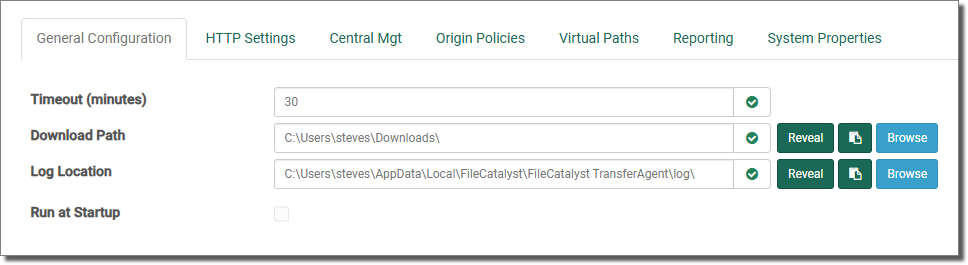
Timeout (minutes) - This value determines how many minutes will pass before an inactive TransferAgent is automatically closed. Any actions will refresh the timer and the application will not close until the specified interval has been met. The default for this value is 30 minutes, which provides the TransferAgent with a 30 minute inactivity timer. If this value is set to 0, the TransferAgent will not use an inactivity timer (the application stays running perpetually).
While loaded, TransferAgent may be performing actions in the background while appearing inactive.
Port - Port is the most important information required by the web page to communicate with the FileCatalyst TransferAgent. Port number is visible by inspecting the application menu. The default port is 12680. The port has to be specified before web page can start communicating with the TransferAgent. The acceptable Port range goes from 1024 to 65534, Port outside this range are often reserved and may cause conflicts.
Download Path - By default, the download location is the “Downloads” folder for the user. The default locations for the download path are as follows:
- On Windows, this folder is located in C:\Users\{USERNAME}\Downloads.
- On Mac OS, this folder is located in /Users/{USERNAME}/Downloads.
- On Linux, this folder is located in {USERHOME}/Downloads.
“Browse” to set a new location or “Reveal” to open that location in your native file system explorer (The “Reveal” functionality is disabled when running as service).
Log Location - Activity logs are stored at the location shown. “Browse” to set a new location or “Reveal” to open that location in your native file system explorer. The “Reveal” functionality is disabled when running as service.
Run at Startup - A system service is an application which is working “behind the scenes” from the moment the operating system loads. By default, FileCatalyst TransferAgent is not installed as a service; however, there are benefits to running as a service. For example, there are fewer user prompts and the application is immediately available when needed. When connected to FileCatalyst Central, it is highly recommended that you run as a service. The only way Central can be expected to have persistent management of TransferAgent is if TransferAgent is running. The text field simply shows the current status (also visible on the page footer); enabling or disabling requires tapping the button.
When the “Run at Startup” checkbox is disabled, this means that TransferAgent requires elevated privileges to continue. Please see “Installing TransferAgent as a Service” for more information.