FileCatalyst Server
FileCatalyst Server is the heart of the FileCatalyst Direct application suite. FileCatalyst Server maps user accounts to directories on your storage, whether that be on-premises or cloud storage. FileCatalyst client applications connect to the server via these user accounts to transfer files to and from mapped storage at speeds up to 10 Gbps. FileCatalyst server also provides remote administration, reporting, groups, virtual files/folder, and email link capabilities.
Overview
Using a Client-Server architecture, FileCatalyst software is required on both ends of the network to accelerate file transfers.
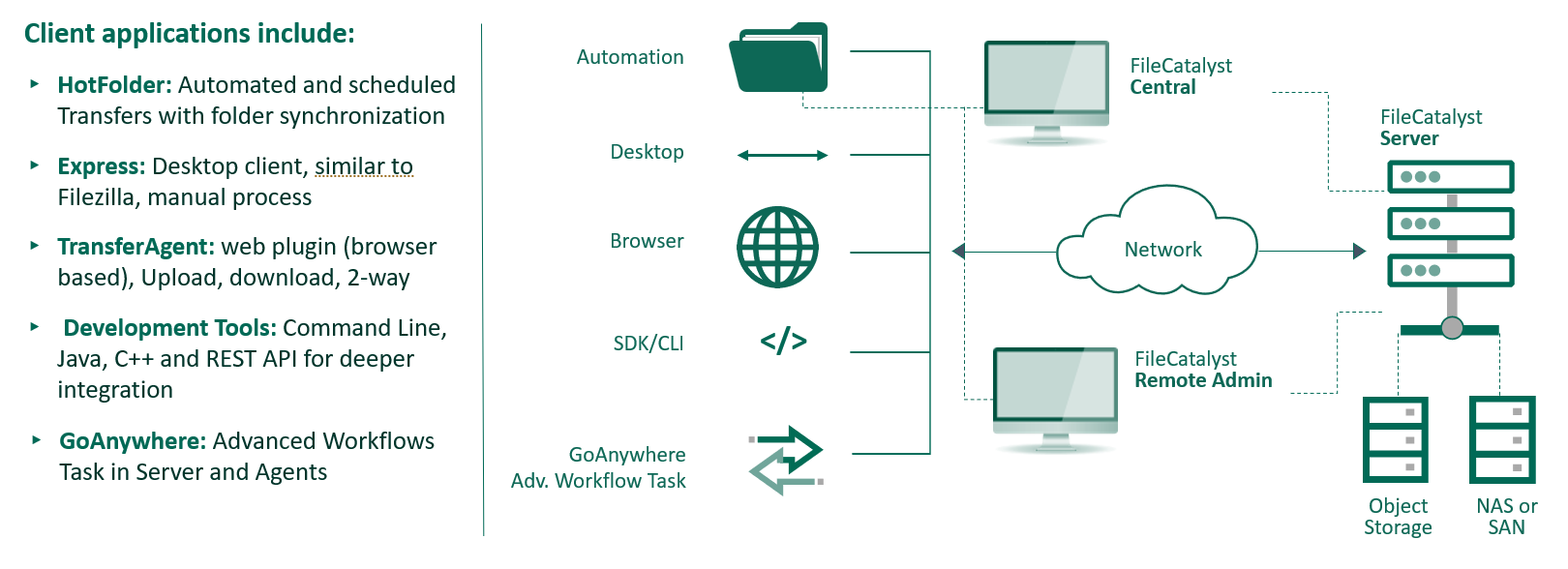
On one side of the network, you install FileCatalyst Server (this app). On the other side of the network one of the following five available FileCatalyst client applications is required:
- HotFolder (for Automation)
- TransferAgent Express (for Desktop)
- TransferAgent Web Plugin (for web browser)
- Command Line, Java or C++ APIs, and RESTfull API (for programmers)
- GoAnywhere Advanced Workflows task (for integration with GoAnywhere to automate and orchestrate fast file transfers)
Web Administration
Although FileCatalyst Server is a computer application or service, it is managed remotely via the web-based administration tool.
This guide is intended to walk the administrator through the interface in order to show how to configure and use FileCatalyst Server.