Connection
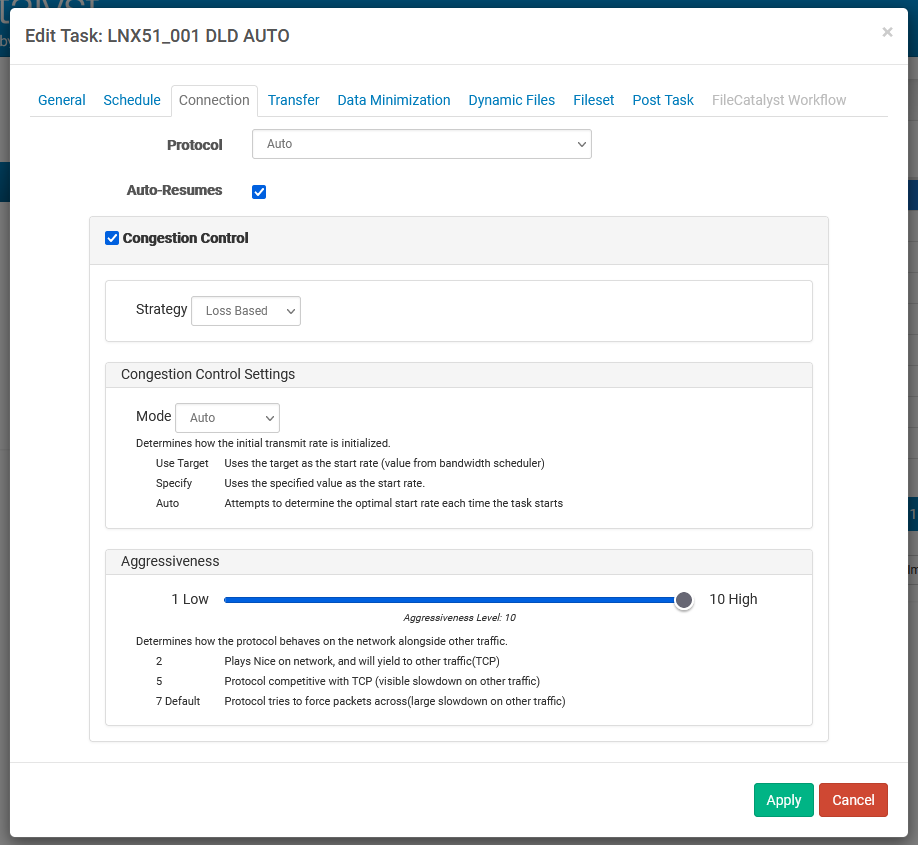
Protocol
This option allows you to specify the transfer mode you wish to use to connect and transfer files to/from the server. Options are UDP, TCP, HTTP (when HTTP Servlet is enabled), and Auto Detect. By selecting Auto Detect, the HotFolder will cascade from UDP to multi-stream TCP to single-stream TCP and finally to HTTP in order to find the optimal mode.
Auto-Resumes
With this option enabled, FileCatalyst HotFolder will automatically recover from failed network connections. This setting takes precedence over the “Transfer Files With Unique Name” options found within the incremental settings. If a file can be resumed and auto-resumes are enabled, the destination file will be resumed and a unique file will not be created at the destination location.
Congestion Control
When Congestion Control is enabled, FileCatalyst will attempt to dynamically modify its transmission rate in accordance with changing network conditions. This is useful if the end to end link speed is not known, or if the network is also being used by other applications with which FileCatalyst would otherwise interfere.
Start Rate
The rate at which FileCatalyst will begin transmitting data. It will then attempt to speed up the transmission rate until it either hits congestion, or it reaches the target rate specified in the bandwidth scheduler.
Three options are available:
-
Use Target: Attempt to transfer at maximum speed allocated by the task. Will slow down if congestion is detected, but initial rate may adversely effect network link if it cannot sustain the transfer speed.
-
Specify: Manually specify a start rate for transfer speed. We recommend a maximum of 1/10th of the known line speed if this is not a dedicated line.
-
Auto: Have the transfer automatically launch an auto-detect when the task starts. This is the best solution for single file transfers. It is not recommended for multi-file session transfers, as each client will attempt to auto-detect transfer speed.
Congestion Control Strategy
RTT-based Strategy
RTT-based strategy works by establishing a baseline average RTT before the data starts to flow. Once the transmission begins, RTT is monitored continuously. While the RTT stays within a certain range of the baseline RTT, the speed of the transfer will be increased. Once the RTT begins to go above a certain range, the speed is decreased. How much the RTT is allowed to spike above the baseline average is controlled by the Congestion Control aggression setting FileCatalyst provides.
This type of congestion control works well on wireless or satellite links where there is packet loss from other sources besides congestion. TCP will slow down, for example, when a packet is lost due to interference or being too far from a cellular tower. When FileCatalyst is using the RTT based congestion control it ignores individual packet losses and focuses only on RTT. For these scenarios, FileCatalyst continues to maintain high speeds through the kinds of packet loss ”hiccups” that would trigger decreases speeds under TCP.
Loss-based Strategy
There are circumstances in which the RTT-based strategy may not work properly. For example, when a router's queue is very small, the RTT may never spike when there is congestion. The RTT will remain low, and therefore FileCatalyst would continue to increase its transmission rate even when there is congestion present. For these scenarios, the only way to detect the congestion is using a packet loss approach. As outlined previously, packet loss may come from other sources besides congestion, so this mode is best used on terrestrial (land-based) networks where all packet loss is due to real congestion.
Loss-based congestion control mode reacts to packet loss by slowing down (just like TCP); however, FileCatalyst is not nearly as aggressive as TCP. The primary reason for using a UDP-based file transfer solution like FileCatalyst is because TCP is so aggressive in its congestion avoidance that it often ends up under-utilizing your link. The FileCatalyst loss-based congestion control algorithm was designed such that it is able to maximize link utilization while still avoiding congestion. Like the RTT-based congestion control, the loss-based mode can be tuned to be more or less aggressive. More aggressive settings allow for a higher percentage of packet loss before slowing down, while for more passive settings the opposite is true.
Rate-based Strategy (Labs)
There are circumstances in which both Loss and RTT will not work properly. If UDP packets are buffered in stacks instead of queues (last in first out vs. first in first out), this interferes with the RTT strategy as the RTT can skip along the top of the stack buffers since it is last in first out. Stack buffering interferes with the Loss-based strategy as loss detection is based on packet ordering and stacks reverse packet order.
Rate-based congestion control mode compares the rate we are sending packets to the rate we are receiving them. If we are receiving slower than we are sending, then we know that the network, at that time, cannot handle the current send rate, and we slow down.
Aggressiveness
This setting allows the threshold (or range) that is used when comparing the current RTT to the initial RTT to be increased or decreased. If aggression is increased, the current RTT will be allowed to increase to a higher level before it is considered to be congestion. Conversely, if the aggression is lowered, smaller increases in RTT will be considered as congestion and transmission rates will slow down. In this way, the congestion control may be tuned to the sensitivity of the network on which the transfers are being performed.