Dynamic Files
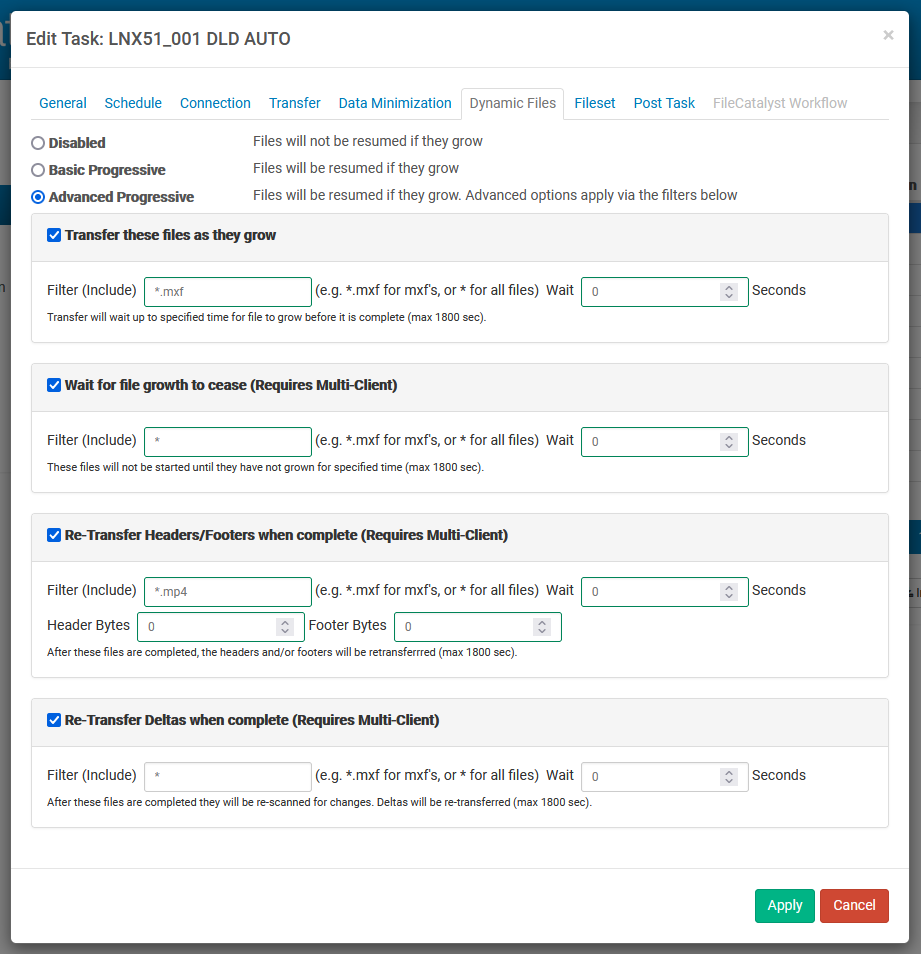
Disabled
This option turns off progressive transfers. Files will not continue to transfer as they grow.
Basic Progressive
Files will transfer as they grow. This is the most basic of progressive features. This is our former "Enable Progressives" feature.
Advanced Progressive
If Advanced Progressive is enabled, one of the four sub-options (described below) must be selected. If one of these sub-options is not selected, the transfer will default to Basic Progressive. Note that in single client transfers only the "Transfer these files as they grow" sub-option will be permitted, as the other options are multi-client specific.
For each selected sub-option, an inclusive filter must be specified (e.g. "*.mxf" for mxf files) to indicate which file types the functionality should be applied to. Files that do not match this filter will be transferred as per Basic Progressive. A wait time (in seconds) may also be specified for each sub-option to modify how long the client waits to check if a file has grown.
Transfer these files as they grow:
These transfers will check for files matching this particular filter within the specified number of seconds. If no changes to the file have occurred within the set time, the file growth will be considered complete. This option is useful for files that grow in intervals with pauses, or if a hard drive is heavily taxed and the actual growth of the file is slower than normal.
Wait for file growth to cease:
These transfers will check for files matching this particular filter within the specified number of seconds. If no changes to the file have occurred within the set time, the file growth will be considered complete. The transfer will only happen after the file growth is considered complete. This option ensures only complete files are being transferred and not ones that are still growing.
Re-Transfer Headers/Footers when complete:
These transfers will wait for a specified amount of time, then the header and footer bytes (as configured) will then be sent and patched into the destination file. This option is useful when the file behaviour is specifically known to change the headers and footers during file growth. It is a low impact, focused delta transfer.
Re-Transfer Deltas when complete:
These transfers will wait for a specified amount of time, then the entire file will be checked for deltas. This option is useful in files where the growth behaviour is unknown but atypical. Checking the entire file has considerably more overhead than the "re-transfer headers/footers"; however, this option works well with a broader range of media files. The default byte limit of header and footer is 1MB and it can be configured (using FC.hotfolder.config.max.headerfooter.bytes) in fchf.conf.
Limitations
It is important to note that if the process growing the file locks said file (as is the case with Windows File Copy), progressive transfers will not work and the file will not transfer until the lock is released.
This feature is designed to handle different types of file growth and/or change during the course of a transfer. Some files grow in a predictable pattern, such as tail-appending log files, while other files may grow and/or change in ways that require more advanced options, such as slow growth files or media files with multiple parts (e.g. multiple audio channels or audio/video files).
Due to the fact that the way a file grows is completely out of our control, if you have growth files, you must configure these options to properly represent that growth or the results can be undefined. For example, if you have a progressively growing file that changes once every 10 seconds but you set up a timeout delay for only 3 seconds, this can fail in a number of different ways depending on when the new data is appended, how it is appended and where we are in the transfer process.
Since some of the dynamic file options will re-transfer all or parts of a file after it is completed, if After Transfer is selected under Verify File Integrity, the verification is moved to after the above options execute.